Chat


Internet Relay CHAT (IRC) allows users to participate in real-time discussions with other users through the Internet. A user logs on to an IRC site and then types messages and replies to others messages as they are written. Often an IRC discussions has a topic and users will join to discuss this topic. Other IRC discussions are free flowing and regardless of how cent red the discussion is it can take some time to sort out the different threads of discussion in a busy IRC.

Instant Messaging


Instant Messaging such as Yahoo and MSN allows users to find friends and contacts through the Internet and communicate with them in real time. Users maintain a list of contacts which the software will notify when they are online and contact is available.

E-mail Attachments

E-mail Attachments

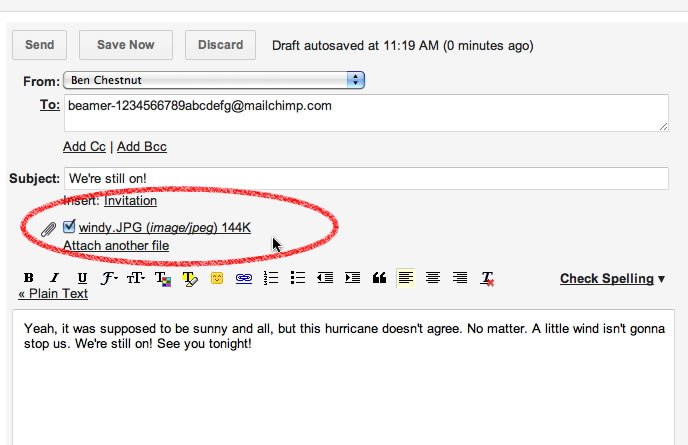
An attachment is a computer file or files place inside an email message. To attach a document to an email message drag the file attachment to the body of the message and drop it. An attachment can also be added by choosing File Attachment from the menu. Most modern email programs place a button on the Toolbar usually in the shape of a paper clip that you can click. A dialog box will open that allows you to browse and select the file that you want to attach. You can attach more than one file to a single email message. Don't move the original document until the message has been sent.

The attached file must be loaded into a program to be viewed. If the attached document was originally created in MS Word you need MS Word on your computer to work with the document. When sending an attachment you should think about whether the intended recipient has the same program on their computer

SEARCH ENGINES


   If you are looking for specific information be source but you don’t know where it is location as the web, you might be able to find it using a search ensign a search engine is built around a data bus that data logs web locations basic all    on content. The and usefulness of a search engine depends in part on the information in it’s database. But it also depends an the search engine’s user interface.

Hyper Links
Word or picture that act as button, allocating you explore with the mouse click.

Web Addresses

      The web built around naming schemes. That allows every information resource on the internet to be referred to using a Uniform Resource Locator or as it’s more commonly known  URL.

THE WORLD WIDE WEB


THE WORLD WIDE WEB
The www is a distributed browsing system originally developed at European laboratory for particle physics (CERN) by research scientist Tim burners – lee in 1993. The internet had been around for years but it was not easy for people to share the information on all of those networked computers. Berners – Lee wanted to create a system that would allow one – click access to document stored on remote computers. He designed a system for giving Internet document unique addressees, wrote the HTML Language for encoding and displaying documents and built a software browser for viewing those document from remote  location.

INTERNET ACCESS OPTIONS


Direct Connection
            In many Department and businesses the computers have a direct (dedicated) connection to the internet through a LAN (Local Area Network). A direct connection offers several advantages. You can take full advantage of internet services without dialing in.

Dial Up Connection
            If your computer isn’t directly connect to the Internet, you can temporarily connect to an internet host through a dial up connection using a Modem (Modem using for converting Analog signal to Digital and Digital signal to Analog)  and standard Telephone lines. The time honored method one that works even with ancient equipment and questionable phone lines is called dial up terminal emulation. A typical connection through a modems and Telephone service is much slower (and often less reliable) than a direct internet connection. While modern modems are theoretically capable of delivering data at 56 kbps. They’re usually much slower when connected to typical noisy phone/lines. 

Broadband Connection
            Today millions of internet users connect via Digital Subscriber Line (DSL) and Satellites. These modern alter natives are often called broadband connection because they have much higher bandwidth there standard modems connection many broadband services offer another big advantages to users; They can be continually connected.

Internet Browsers
The Internet browser. This is the program that locates websites for you and allows users to maneuver around (surf) the World Wide Web and view web pages. The two most popular today are Netscape Navigator and Microsoft's Internet Explorer though Mosaic was the first and still used by some people. Opera, Mozilla, Farscape are another. Before graphic browsers Lynx was the most popular browser and is still available for text browsing. Some ISP have a proprietary type of browser though most have given up this practice as it limits the users abilities to browse the Internet.

Type the URL (Uniform Resource Locater) or Web Address of the website that you want to visit in the address bar of your browser and press Enter or click Go. Collect your favorite websites by adding them to your Favorites or Bookmarks. To go to a Favorite or Bookmark, click on the menu and click on the link.


Why would you want to use it ( Internet)?


There are so many things you can do and participate in once connected to the internet. They include using a range of services to communicate and share information and things quickly and inexpensively with tens of millions of people, both young and old and from diverse cultures around the world. For example:

•             You'll be able to keep in touch and send things to colleagues and friends using electronic mail, internet telephone, keyboard chat and video conferencing.
•             You can also tap into thousands of databases, libraries and newsgroups around the world to gather information on any topics of interest for work or recreation. The information can be in the form of text, pictures or even video material.
•             This means you can stay up to date with news, sports, weather and any current affairs around the world with information updated daily, hourly or instantly.
•             You can also locate and download computer software and other products that are available in cyberspace
•             You can listen to sounds and music, and watch digital movies

                There are also a growing number of interactive multimedia games and educational tools. And as well as using the Internet for receiving things you will be able to publish information about your school, hobbies or interests.

There are 4 things that are necessary to "get on the internet" with a full graphic interface (picture, sounds, animation, etc...).
•             A computer - preferably with a fast processor (around 100 MHz or more) and lots of memory (16 MB or more)
•             A modem – (Internal or External)
•             Browser Software (Eg. Internet Explorer, Netscape Navigator, Opera)
•             An ISP - An Internet Service Provider is a service that connects your home or office computer to the Internet  and  Telephone Line 

Once you have purchased an account with an ISP you will be given an account name. This is often your email address   as well. You will also be given a password and should also be provided with instructions. Protect your password as you would any personal identification number (PIN) number.  The ISP will also provide information on how to configure your software. This can be simple or difficult depending on your Operating System. Once configured you simply run the software to connect your computer's modem to the ISP's modem, giving you access to the Internet.

What is the Internet?


            The internet is made up of millions of computers linked together around the world in such a way that information can be sent from any computer to any other 24 hours a day. These computers can be in homes, Forces, schools, universities, government departments, or businesses small and large. The internet is often described as 'a network of networks' because all the smaller networks of organizations are linked together into the one giant network called the internet.
            The internet has developed a very strong community base where information, software and expert advice are freely shared and for this reason users have developed a very strong protective stance on freedom of speech, freedom from commercial interests, netiquette and unsuitable material on the web. 

The History


The net has actually been around for over 40 years. It all began in the US during the Cold War, as a university experiment in military communications. By linking lots of computers together in a network.
                At first each computer was physically linked by cable to the next computer, but this approach has obvious limitations, which led to the development of networks utilizing the telephone system